Why leads labeled valid still bounce
Lead databases and enrichment tools often attach their own confidence label to an address. That label records what the tool believed when it last checked, which can be weeks or months before your export. Between that check and your send, people change jobs, companies migrate mail providers, and mailboxes are closed. The label stays; the mailbox does not.
A second cause is that many lead tools find addresses by pattern. If most people at a company are first.last@company.com, a tool can produce that address for anyone, whether or not that person's mailbox exists. A pattern guess is a hypothesis, not a confirmed mailbox, and only a check against the mail server turns it into an answer.
The third cause is plain decay. Contact data goes stale continuously, so any list that has sat unused will contain addresses that were fine when collected. The practical rule is the same in all three cases: verify at the time you send, not at the time the data was collected.
The verification workflow
The workflow has five steps, shown below. Steps one and two are preparation, step three is the check, step four decides what happens to each result, and step five is how you send. None of it depends on which prospecting tool or sequencer you use, because it all happens on a CSV file between them.
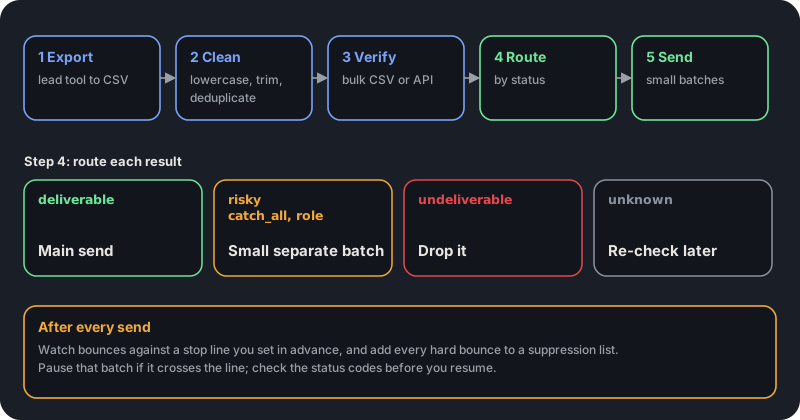
- Export: pull the leads as a CSV with the email column and any fields you need to personalize.
- Clean: lowercase and trim addresses, then deduplicate, so you do not check or send to the same address twice.
- Verify: upload the CSV for a bulk check, or call the API for each lead as it is found.
- Route: split the file by status, as described in the next section.
- Send: start small, and expand only while results stay inside your limits.
Route each result differently
A status is a decision aid, not a pass or fail. Deliverable addresses are your main list. Undeliverable addresses are removed for good: do not retry them from another mailbox or domain, because the address does not exist and a second attempt only adds to the bounce record.
Risky is the interesting bucket, and the reason field tells you which kind. A catch_all result means the domain accepts everything, so the mailbox is unconfirmed, and these are often a large share of a business list. Disposable addresses are never real prospects. Role addresses such as info@ and sales@ rarely reply and are more likely to complain, so leave them out unless the role is your target.
Unknown means the receiving server did not answer clearly. VeriDock does not bill unknown results, and re-checking the same address within 30 days is free, so queue them and try again after a day instead of guessing.
Never merge the risky bucket back into the main send. Keeping it separate is what lets a bad batch hurt only itself.
Set a stop line before the first send
Decide in advance what bounce rate makes you pause, because it is hard to be objective once a campaign is live. Pick a number, write it down, and apply it to each batch. Two percent is a common choice, but it is an illustration, not a rule from any mailbox provider, and your own tolerance should reflect how much your domain can afford to lose.
Then use batches. Send the deliverable list in a first small batch to confirm the numbers, hold the risky list for a separate mailbox or a later window, and scale up only while the bounce rate stays under your line. If a batch crosses it, stop and read the bounce codes before the next one: permanent address errors mean your verification missed something, and policy blocks mean the problem is your setup.
- Send a small first batch of deliverable addresses and check the bounce rate.
- Hold risky addresses for a smaller batch from a separate mailbox.
- Keep a suppression list that spans every campaign and tool, and add each hard bounce to it.
- If a batch crosses your stop line, pause and read the bounce codes before continuing.
Automate it with the API
If you build lists with scripts or an enrichment pipeline, check each lead as it is found and store the status next to the address, so routing is a filter on a column and not a manual step. Any tool that can make an HTTP request can do this. Test keys that start with vd_test_ return fixed results without using credits, so you can build and test the pipeline for free.
The snippet below checks one address and decides which bucket it belongs in. It sends the main list the deliverable results, holds risky addresses back, and drops the rest, with unknown results queued for a later retry.
type Bucket = "send" | "hold" | "drop" | "retry";

export async function routeLead(email: string): Promise<Bucket> {
  const res = await fetch(`https://app.veridock.io/v1/verify?email=${encodeURIComponent(email)}`, {
    headers: { Authorization: `Bearer ${process.env.VERIDOCK_API_KEY}` },
    signal: AbortSignal.timeout(10_000),
  }).catch(() => null);
  if (!res?.ok) return "retry"; // never drop a lead because of our own failure

  const { status, reason } = await res.json();
  if (status === "deliverable") return "send";
  if (status === "undeliverable") return "drop";
  if (status === "risky") return reason === "disposable" || reason === "role_account" ? "drop" : "hold";
  return "retry"; // unknown
}
What verification does not do
Verification tells you whether an address can receive mail. It cannot tell you whether the person wants your message, whether your content triggers filters, or whether your authentication is set up correctly. A perfectly verified list sent from a domain with failing SPF or DKIM will still land in spam.
It also cannot confirm a mailbox on a catch-all domain, which is why those results are held back and not promoted. If a result is risky, it is risky: the right response is a smaller, separate batch and a close look at the numbers, not an assumption that the address works.
Key takeaways
0/5Try it on a real address
Run syntax, DNS, MX, disposable, and role checks on any address. No signup needed.
Enter an address and press Check.
Runs real syntax, DNS and mail-server checks.
This demo checks syntax, domain, mail server, disposable and role-address rules. Sign up free for live mailbox checks.
Frequently asked questions
Verify addresses with one API call.
250 free checks to start, no card required. Unknown results are never billed.