Two codes in every bounce
A bounce usually carries two codes. The first is the three-digit SMTP reply code from the SMTP standard (RFC 5321), such as 550 or 452. The second is the enhanced status code from RFC 3463, written as three numbers separated by dots, such as 5.1.1. The enhanced code is the more useful of the two because it says what went wrong, not just how badly.
The enhanced code reads class, subject, detail. The class is the first number: 2 means success, 4 means a temporary failure worth retrying, and 5 means a permanent failure. The subject groups the cause, for example 1 for addressing problems and 7 for security or policy. The detail narrows it down.
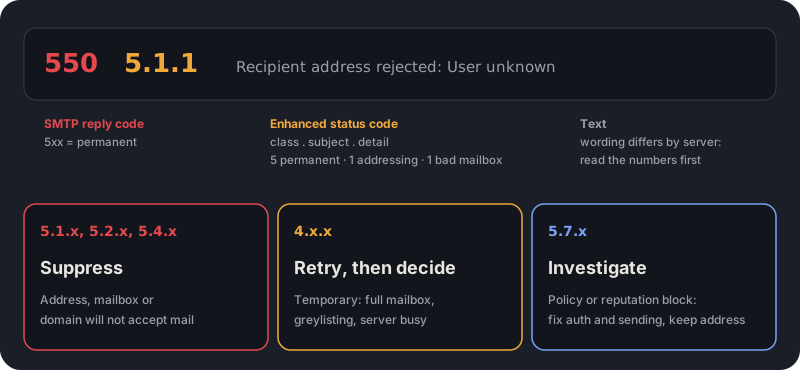
550 5.1.1: the address does not exist
This is the bounce you want to see least. 5.1.1 is defined as a bad destination mailbox address: the domain is real and its server answered, but there is no such mailbox. It is the classic user-unknown bounce, usually delivered with a 550 reply and wording such as recipient address rejected or the account does not exist.
Treat it as permanent. Add the address to a suppression list immediately and never send to it again. Repeated sends to nonexistent mailboxes are the single most common reason a sender's bounce rate climbs, and mailbox providers notice.
Microsoft 365 often reports the same situation with 5.1.10, accompanied by text mentioning that the recipient was not found. The wording differs, but the meaning and the response are the same.
Other permanent codes about the address or domain
Several other 5.x.x codes also mean the destination is wrong, in different ways. All of them are reasons to suppress, but knowing which one you got tells you where the problem entered your list.
- 5.1.2 bad destination system address: the domain part is wrong or does not exist, which usually points to a typo such as gmial.com.
- 5.1.3 bad destination mailbox address syntax: the address is malformed. This should never reach a mail server if you validate syntax first.
- 5.2.1 mailbox disabled: the mailbox exists but is not accepting mail, for example a deactivated account. Suppress it.
- 5.4.4 unable to route: the sending server could not find a route to the destination, often because the domain has no working mail servers.
- 550 on its own: the generic mailbox unavailable reply. Read the enhanced code beside it, because it carries the real reason.
A cluster of 5.1.2 bounces is a data-entry problem, not a mail problem. Fix the form that collected those addresses.
Temporary codes: 4.x.x and what to do
A 4.x.x code or a 4xx reply means the server could not accept the message now but may later. The sending server normally retries for a period of hours or days on its own, and you only see a bounce if the delivery finally times out, which is reported as 4.4.7, delivery time expired.
The common causes are a full mailbox (4.2.2, over quota), a server that is down or not answering (4.4.1), and temporary blocks such as greylisting or throttling, where a server deliberately refuses the first attempt from an unknown sender or slows a sender that is going too fast.
Do not suppress an address on a single temporary bounce. Do track repeats. An address that returns a temporary failure on several sends in a row is functionally dead, and many senders choose a cutoff, for example three or four consecutive soft bounces, after which they suppress it. The exact number is your policy, but write it down before you need it.
5.7.x: when the problem is you, not the address
The 5.7.x family covers security and policy decisions. The base case, 5.7.1, is defined as delivery not authorized, message refused. In practice it appears when a server rejects your message because of how you sent it: failed authentication, a blocklisted IP address or domain, a content filter, or a policy limit.
This is where blindly suppressing addresses goes wrong. The recipient may be perfectly valid, and the block applies to everyone you send to at that provider. Read the text for the reason, check your SPF, DKIM and DMARC records, check whether your sending IP or domain is on a blocklist, and look at your complaint rate. Suppress the address only if the text says the recipient has blocked you.
Automate the first decision
A small function can make the first-pass call from the raw reply text, so your bounce handler suppresses user-unknown addresses, queues the temporary failures for a retry count, and routes policy blocks to a person. It reads the enhanced code when there is one and falls back to the first digit of the reply code.
Treat the result as a default, not a verdict. Some servers use codes loosely, and a few return 5.1.1 for policy blocks, so keep the original reply text in your logs and review the investigate bucket regularly.
type Action = "suppress" | "retry" | "investigate";

export function classifyBounce(reply: string): Action {
  // "550 5.1.1 User unknown" -> class 5, subject 1
  const enhanced = reply.match(/^\d{3}[ -](\d)\.(\d{1,3})\.\d{1,3}\b/);
  const klass = enhanced ? enhanced[1] : reply.trim()[0]; // fall back to the reply code digit
  const subject = enhanced ? enhanced[2] : "";

  if (klass === "4") return "retry";
  if (klass === "5") return subject === "7" ? "investigate" : "suppress";
  return "investigate";
}

// classifyBounce("550 5.1.1 Recipient address rejected: User unknown") -> "suppress"
// classifyBounce("452 4.2.2 Mailbox full")                              -> "retry"
// classifyBounce("550 5.7.1 Message blocked by policy")                 -> "investigate"
Stop most 5.1.1 bounces before you send
Almost every user-unknown bounce is avoidable, because the answer exists before you send. Email verification asks the receiving server the same question a delivery would, using the SMTP conversation, and stops before any message goes out. VeriDock reads the same kinds of replies and reports them as an undeliverable status with a reason, so the bounce never happens.
The reasons line up with the codes above. A rejected_email result is the user-unknown case, invalid_domain and no_mx_record cover the wrong or unroutable domain, and mailbox_full corresponds to the over-quota family. Unknown means the server gave no clear answer, so there is nothing honest to report, and VeriDock does not bill it.
Verification cannot prevent temporary failures or 5.7.x blocks, which depend on the server's state and your own reputation. It removes the permanent, address-level bounces, which is the part that most directly damages a sender's record.
- Verify before the first send, and again before a large campaign to a list that has aged.
- Add every permanent bounce to a suppression list that persists across tools.
- Review 5.7.x bounces weekly and fix authentication before they spread.
Key takeaways
0/5Try it on a real address
Run syntax, DNS, MX, disposable, and role checks on any address. No signup needed.
Enter an address and press Check.
Runs real syntax, DNS and mail-server checks.
This demo checks syntax, domain, mail server, disposable and role-address rules. Sign up free for live mailbox checks.
Frequently asked questions
Verify addresses with one API call.
250 free checks to start, no card required. Unknown results are never billed.