Who the rules apply to
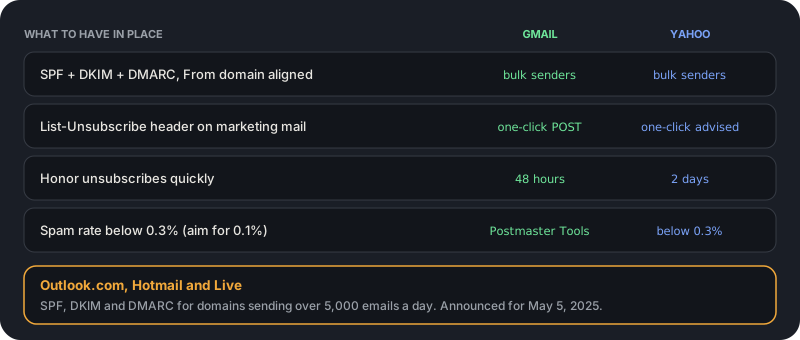
Google defines a bulk sender as one that sends more than 5,000 messages to personal Gmail addresses in a day. Yahoo applies its rules to bulk senders as well. Microsoft's announcement set the same 5,000-a-day line for domains sending to Outlook.com, Hotmail and Live addresses, with enforcement announced from May 5, 2025.
Below the line you are not formally a bulk sender, but the guidance still applies. Google says all senders need at least SPF or DKIM, and the practices that satisfy bulk-sender rules are also what mailbox providers reward in general. Treat the checklist as the baseline for any domain you send from.
Authenticate with SPF, DKIM and DMARC
Bulk senders must set up all three. SPF lists which servers may send for your domain, DKIM signs each message so it cannot be altered unnoticed, and DMARC tells receivers what to do when a message fails and sends you reports. Yahoo asks for a valid DMARC policy of at least p=none that passes, and for DKIM keys of at least 1,024 bits. Microsoft's requirements are reported to accept p=none as the minimum too.
Alignment matters as much as passing. The domain in the visible From address has to match the domain that passed SPF or DKIM. Google requires only one of the two to align, and recommends aligning both. A common failure is sending through a third-party tool that signs with its own domain, so authentication passes but does not align with yours.
p=none is the starting point, not the goal. It satisfies the requirement and gives you reports; moving to quarantine or reject over time protects your domain from spoofing. Add the policy only after the reports show your legitimate senders pass.
- Publish an SPF record that includes every service that sends for you, and stay under the 10 DNS lookup limit.
- Enable DKIM signing in each sending tool with your own domain, not the tool's.
- Publish a DMARC record at _dmarc.yourdomain with at least p=none and a reporting address.
- Send a test message and check the headers for spf=pass, dkim=pass and dmarc=pass.
Make unsubscribing one click
Gmail requires one-click unsubscribe for marketing and promotional messages, not for transactional mail. It means List-Unsubscribe headers as described in RFC 8058: a header that gives a URL, and a second header that tells the mail client it may send a one-click POST request to that URL. A link in the message body does not count on its own.
Yahoo accepts a mailto header but highly recommends the RFC 8058 method and also asks for a visible unsubscribe link in the body. Both providers expect unsubscribes to be honored quickly: Gmail's FAQ says within 48 hours, and Yahoo says within 2 days. Build the suppression into your sending system so it takes effect before the next send, not after.
List-Unsubscribe: <https://example.com/unsubscribe/abc123>, <mailto:unsubscribe@example.com>
List-Unsubscribe-Post: List-Unsubscribe=One-Click
Keep your spam rate under 0.3%
Both providers use 0.3% as the line for spam complaints, and Google says to aim well below it: keep the rate reported in Postmaster Tools under 0.1% and never let it reach 0.3%. The spam rate is the share of messages users mark as spam, so it is driven by who you send to and what you send.
Gmail's Postmaster Tools is how you see your number. Register your sending domain there and look at it before and after every change in who you mail. A rate that creeps up is usually a list problem: old subscribers, purchased or scraped contacts, or people who never asked to hear from you.
These rules publish a complaint threshold, not a bounce threshold. Mailbox providers do not say how they weigh bounces, so keep yours low as a matter of sender reputation, not because a number was published.
Where list hygiene fits
Email verification is not on the requirements list, and it does not fix authentication or consent. What it does is control a part of your sender record the requirements care about indirectly: who you are sending to. Dead addresses bounce, and some old addresses are recycled into spam traps. Both are signals about the quality of your list.
Verify before large sends and before importing a list you did not collect yourself. Remove undeliverable addresses, handle risky ones such as catch-all and role addresses deliberately, and suppress anyone who unsubscribes or complains. VeriDock returns a status and reason for each address so you can write those rules, and it never bills unknown results.
A one-hour audit
Work through the list below for each domain you send from. Most of it is DNS and settings, and fixing a gap usually takes minutes. The order matters: authentication first, because without it the other items do not help.
- Check SPF, DKIM and DMARC with a lookup tool and confirm alignment on a real test message.
- Confirm every marketing message carries List-Unsubscribe and List-Unsubscribe-Post headers.
- Test one-click unsubscribe end to end and confirm the address is suppressed before your next send.
- Register the domain in Google Postmaster Tools and check the spam rate.
- Verify any list older than a few months before you send to it.
- Read Microsoft's announcement for the current enforcement stage if you send to Outlook.com addresses.
Where these rules come from
These requirements change, and public summaries disagree on details such as exactly how non-compliant mail is treated. For anything that matters, read the primary sources directly. This article reflects them as of November 2026.
- Google: the Email sender guidelines and the Email sender guidelines FAQ in Gmail Help (support.google.com).
- Yahoo: the Sender Hub best practices at senders.yahooinc.com.
- Microsoft: the Outlook blog post on new requirements for high-volume senders (April 2025, Microsoft Tech Community).
Key takeaways
0/5Try it on a real address
Run syntax, DNS, MX, disposable, and role checks on any address. No signup needed.
Enter an address and press Check.
Runs real syntax, DNS and mail-server checks.
This demo checks syntax, domain, mail server, disposable and role-address rules. Sign up free for live mailbox checks.
Frequently asked questions
Verify addresses with one API call.
250 free checks to start, no card required. Unknown results are never billed.