Check syntax instantly in the browser
Browser-side validation should answer one question: could this string possibly be an address? A loose pattern that requires one @ sign with a dot somewhere after it catches structural typos without rejecting unusual but real addresses, which stricter regexes often do. The native type=email input and the required attribute get you most of the way without any JavaScript.
What the browser cannot tell you is whether the domain has a mail server or whether the mailbox exists. That needs a request to a verification API, and it needs your API key, which cannot live in the bundle where anyone can read it.
Debounce the server check in a custom hook
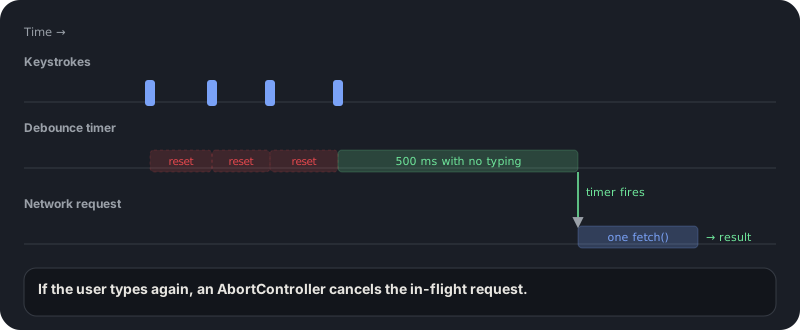
The hook below waits until the user pauses typing, then asks your own backend to verify the address. Every keystroke restarts the timer and cancels the previous one, so a person typing a full address triggers one request, not twelve.
An AbortController also cancels any request that is still in flight when the input changes, and the result is stored together with the address it was for. That second detail matters: without it, the hint for the old address stays on screen while the user is already typing a new one.
import { useEffect, useState } from "react";

const looksLikeEmail = (s: string) => /^[^\s@]+@[^\s@]+\.[^\s@]+$/.test(s);

export type Check = { status: string; reason?: string; suggestion: string | null };

export function useEmailCheck(email: string, delay = 500) {
  // Keep the address with its result so a stale answer is never shown for a newer input.
  const [state, setState] = useState<{ for: string; check: Check } | null>(null);
  const [loading, setLoading] = useState(false);

  useEffect(() => {
    if (!looksLikeEmail(email)) {
      setState(null);
      setLoading(false);
      return;
    }
    const controller = new AbortController();
    const timer = setTimeout(() => {
      setLoading(true);
      fetch(`/api/check-email?email=${encodeURIComponent(email)}`, { signal: controller.signal })
        .then((r) => (r.ok ? r.json() : null))
        .then((check: Check | null) => setState(check && { for: email, check }))
        .catch(() => {}) // aborted or offline: show nothing
        .finally(() => {
          if (!controller.signal.aborted) setLoading(false);
        });
    }, delay);
    return () => {
      clearTimeout(timer);
      controller.abort();
    };
  }, [email, delay]);

  return { result: state?.for === email ? state.check : null, loading };
}
Proxy the request through your server
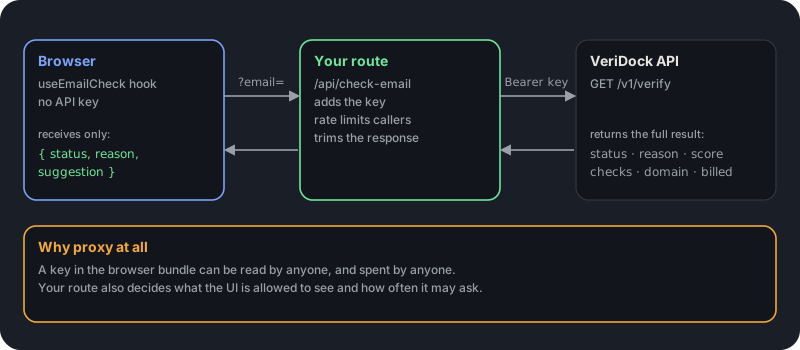
The hook calls /api/check-email, not the verification provider. A small server route adds the VERIDOCK_API_KEY header, forwards the address, and returns only the fields the UI needs. Anything that goes wrong on the way, from a timeout to a 401 or 429 from the provider, comes back as unknown, which the UI treats as a pass.
Keeping the key on the server also lets you rate limit the route, for example per IP address, so a bot cannot burn through your quota from the signup page.
export async function GET(req: Request) {
  const email = (new URL(req.url).searchParams.get("email") ?? "").trim();
  const unknown = Response.json({ status: "unknown", suggestion: null });
  if (!email || email.length > 254) return unknown;

  const res = await fetch(`https://app.veridock.io/v1/verify?email=${encodeURIComponent(email)}`, {
    headers: { Authorization: `Bearer ${process.env.VERIDOCK_API_KEY}` },
    signal: AbortSignal.timeout(8_000),
  }).catch(() => null);
  if (!res?.ok) return unknown; // timeout, 401, 402, 429, 5xx: fail open

  const { status, reason, suggestion } = await res.json();
  return Response.json({ status, reason, suggestion });
}
Wire it into an accessible field
The field below shows one of two things: a blocking message when the address is undeliverable, or a typo suggestion the user can accept with one click. Both live in a single element that the input points to with aria-describedby, and only the blocking message uses role=alert, so screen readers are not interrupted by every suggestion.
Notice what is missing: the submit button is never disabled while the check runs. The check is a convenience, not a gate.
"use client";
import { useState } from "react";
import { useEmailCheck } from "./useEmailCheck";

export function EmailField() {
  const [email, setEmail] = useState("");
  const { result, loading } = useEmailCheck(email.trim().toLowerCase());
  const blocked = result?.status === "undeliverable";

  return (
    <div>
      <label htmlFor="email">Work email</label>
      <input
        id="email" name="email" type="email" required value={email}
        onChange={(e) => setEmail(e.target.value)}
        aria-invalid={blocked} aria-describedby="email-hint"
      />
      <p id="email-hint" role={blocked ? "alert" : undefined}>
        {loading && "Checking..."}
        {!loading && blocked && "That address cannot receive mail."}
        {!loading && result?.suggestion && (
          <> Did you mean <button type="button" onClick={() => setEmail(result.suggestion!)}>{result.suggestion}</button>?</>
        )}
      </p>
    </div>
  );
}
Never block on uncertainty
Only an undeliverable status should produce a blocking error. Offer the suggestion field as a one-click fix for typos, and let risky and unknown results submit normally; your server can re-check them after signup. If the check has not returned by the time the user submits, let the submit go through and verify server-side.
Unknown is not a failure. It means the receiving mail server did not give a clear answer, and VeriDock does not bill those results. Re-verifying the same address within 30 days is free, so a later server-side check costs nothing extra.
- Set aria-invalid on the input only for undeliverable results.
- Render blocking errors with role=alert; render suggestions as plain text.
- Keep the submit button enabled while the debounced check is running.
- Treat unknown as a pass in the UI and re-verify on the server.
Debounce at 400 to 600 ms: shorter wastes API calls on every keystroke, longer makes the feedback feel disconnected from typing.
Test the hook without a real mail server
Use a vd_test_ key in development and CI. Test keys return deterministic fixtures and never consume credits, so your tests do not depend on a live mail server or on your balance.
The debounce is easy to test with fake timers: type several characters, advance the clock by less than the delay and assert that no request was sent, then advance past it and assert exactly one. A second test that changes the input while a request is pending should confirm the first is aborted.
- Typing quickly sends one request after the pause, not one per keystroke.
- Changing the input mid-request aborts the first request.
- A failed or non-200 response renders nothing and leaves the form usable.
- A result for the old address is never shown for the new one.
Key takeaways
0/5Try it on a real address
Run syntax, DNS, MX, disposable, and role checks on any address. No signup needed.
Enter an address and press Check.
Runs real syntax, DNS and mail-server checks.
This demo checks syntax, domain, mail server, disposable and role-address rules. Sign up free for live mailbox checks.
Frequently asked questions
Verify addresses with one API call.
250 free checks to start, no card required. Unknown results are never billed.