How the request travels
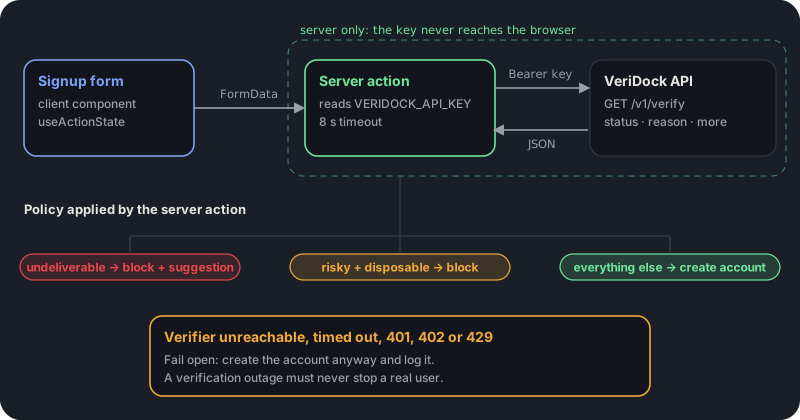
The browser never talks to VeriDock. The form posts to a server action, the server action calls the API with your secret key, and the action decides what the user sees. That one rule keeps the key out of the client bundle and gives you a single place to change the policy later.
The rest of this guide builds each box in the diagram below. For a shorter, copy-and-paste version of the same setup, see the Next.js integration guide linked at the end.
Keep the API key out of the client bundle
Next.js only exposes environment variables prefixed with NEXT_PUBLIC_ to the browser, so name the variable VERIDOCK_API_KEY and read it only inside server code. Server actions and route handlers both run on the server, and either is fine; a server action is the shortest path for a form because it receives the FormData directly.
Put the key in .env.local, which Next.js ignores from git by default, and add an empty entry to .env.example so teammates know it is required. In production, set it in your hosting provider's environment settings rather than committing any file that contains it.
Verify inside a server action
The action normalizes the address, calls the VeriDock endpoint with a timeout, and returns a small state object the form can render. Only an undeliverable status blocks the signup, plus disposable addresses if your product needs that.
Anything that is not a clean answer from the API (a timeout, a network error, a 401 for a bad key, a 402 for exhausted credits, a 429 for too many concurrent requests) falls through and creates the account. Those are your problems, not the user's, and a verification outage should never stop a real person from signing up.
"use server";
import { createAccount } from "@/lib/users"; // your code: returns {} on success or { error }

export type SignupState = { error?: string; suggestion?: string | null };

export async function signup(_prev: SignupState, formData: FormData): Promise<SignupState> {
  const email = String(formData.get("email") ?? "").trim().toLowerCase();
  if (!email || email.length > 254) return { error: "Enter your email address." };

  const res = await fetch(`https://app.veridock.io/v1/verify?email=${encodeURIComponent(email)}`, {
    headers: { Authorization: `Bearer ${process.env.VERIDOCK_API_KEY}` },
    signal: AbortSignal.timeout(8_000),
  }).catch(() => null);

  // Timeout, network error, 401, 402, 429 or 5xx: log it and let the user in.
  if (!res?.ok) {
    console.error("verification skipped", res?.status ?? "network error");
    return createAccount(email);
  }

  const result = await res.json();
  if (result.status === "undeliverable") {
    return { error: "That address cannot receive mail.", suggestion: result.suggestion };
  }
  if (result.status === "risky" && result.reason === "disposable") {
    return { error: "Please use a permanent email address." };
  }
  return createAccount(email);
}
Show feedback and a pending state with useActionState
On the client, useActionState from React 19 gives you the latest state and a pending flag, so the button can disable itself while the check runs and the error can render next to the field. Pass the action it returns straight to the form's action prop. Link the error to the input with aria-describedby and give it role=alert so screen readers announce it.
The suggestion field, when present, is a typo correction such as gmail.com for gmial.com. Show it as plain text and offer it as a one-click fix.
"use client";
import { useActionState } from "react";
import { signup, type SignupState } from "./actions";

export function SignupForm() {
  const [state, action, pending] = useActionState<SignupState, FormData>(signup, {});
  return (
    <form action={action}>
      <input name="email" type="email" required aria-invalid={!!state.error} aria-describedby="email-error" />
      <button type="submit" disabled={pending}>{pending ? "Checking..." : "Create account"}</button>
      {state.error && <p id="email-error" role="alert">{state.error}</p>}
      {state.suggestion && <p>Did you mean {state.suggestion}?</p>}
    </form>
  );
}
Decide what each result should do
Branch on status first. Use reason only when you want a finer rule. Risky is a bucket, not a verdict, and the reason tells you which kind: disposable addresses are usually worth blocking at signup, while role accounts such as support@ and catch-all domains are often legitimate, so let them through and rely on your confirmation email.
Unknown means the mail server did not give a clear answer. VeriDock never bills unknown results, and re-verifying the same address within 30 days is free, so the right move is to accept the signup and check again later in a background job.
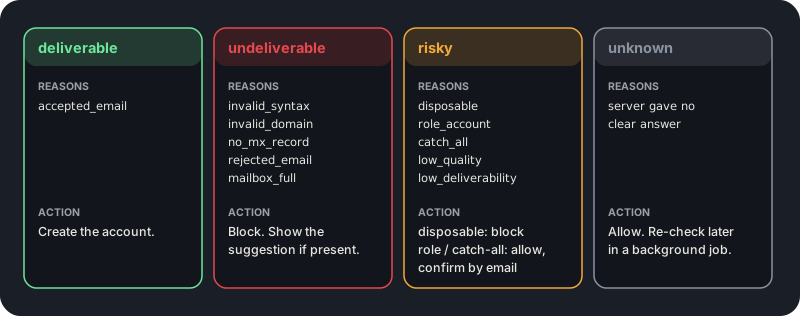
Only undeliverable should block a signup outright; everything else is a signal to confirm, not a reason to reject.
Test without spending credits
VeriDock test keys start with vd_test_ and return deterministic fixtures, so they never consume credits. Put one in .env.local while you build the form and in CI so your tests do not depend on a live mail server.
Before shipping, run one real address of each kind through the form with a live key: a normal address, one with a typo in the domain, and a throwaway address from a disposable-mail provider. That confirms the error messages, the suggestion link and the fail-open path all behave the way you expect.
- Use a vd_test_ key locally and in CI; switch to the live key only in production.
- Simulate an outage by pointing the action at an unreachable host and confirm the account is still created.
- Log the status and reason you acted on, so you can tune the policy from real data instead of guesses.
Key takeaways
0/5Try it on a real address
Run syntax, DNS, MX, disposable, and role checks on any address. No signup needed.
Enter an address and press Check.
Runs real syntax, DNS and mail-server checks.
This demo checks syntax, domain, mail server, disposable and role-address rules. Sign up free for live mailbox checks.
Frequently asked questions
Verify addresses with one API call.
250 free checks to start, no card required. Unknown results are never billed.